AI prompts
base on Power of Kubernetes, Simplicity of Heroku <br/>
<div align="center">
<a href="https://github.com/czhu12/canine">
<img src="https://github.com/czhu12/canine/blob/main/public/images/logo-full.png?raw=true" alt="Logo" height="100">
</a>
<h3 align="center">Canine</h3>
<p align="center">
Power of Kubernetes, Simplicity of Heroku
<br/>
<br/>
<a href="https://docs.canine.sh"><strong>Explore the docs »</strong></a>
<br/>
<br/>
<a href="https://canine.sh">View Demo .</a>
<a href="https://github.com/czhu12/canine/issues/new?labels=bug">Report Bug .</a>
<a href="https://github.com/czhu12/canine/issues/new?labels=enhancement">Request Feature</a>
</p>
</div>
[](https://github.com/czhu12/canine/actions/workflows/ci.yml)
[](https://opensource.org/licenses/Apache)
[](https://artifacthub.io/packages/search?repo=canine)
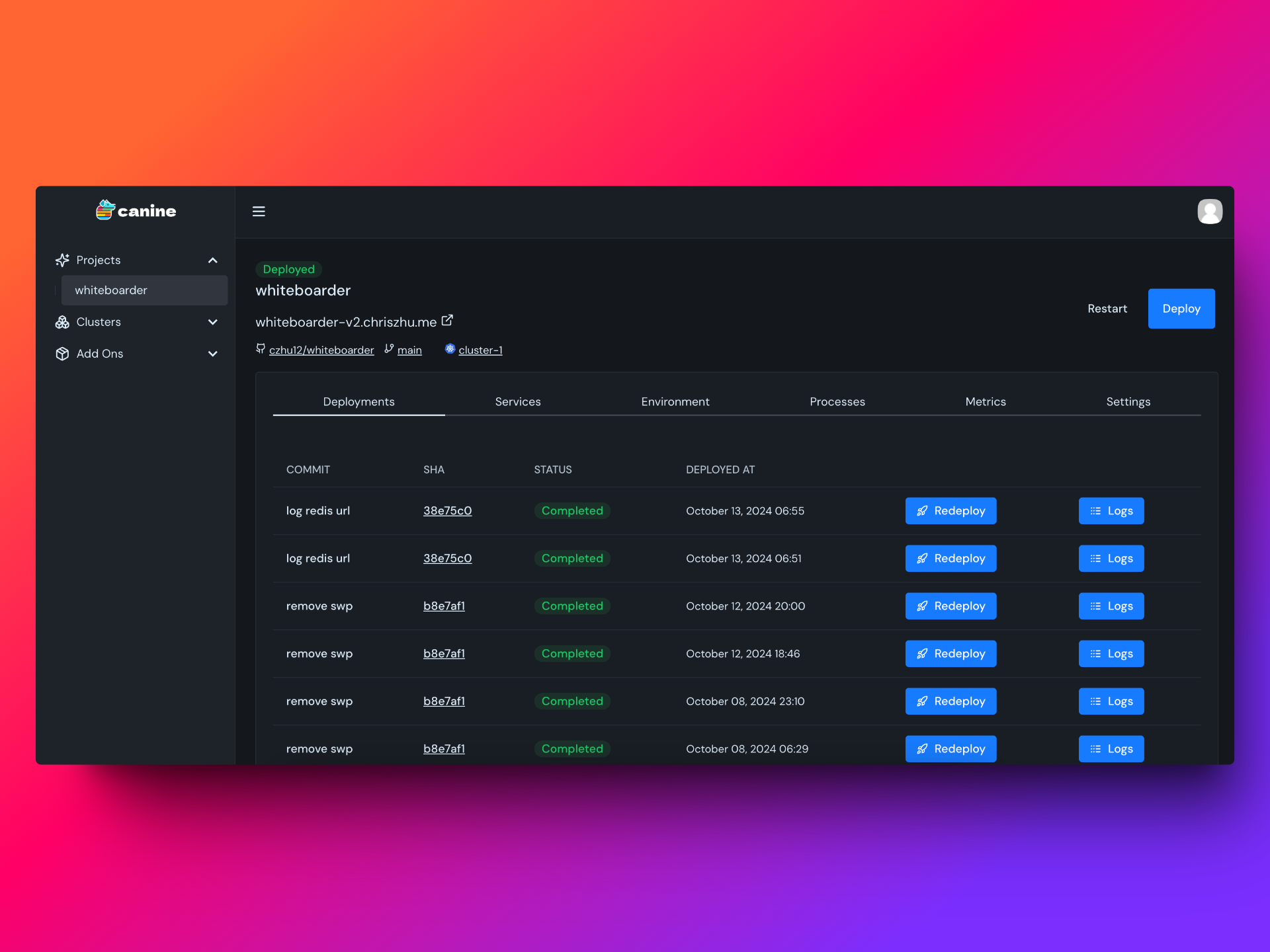
## About the project
Canine is an easy to use intuitive deployment platform for Kubernetes clusters.
## Requirements
* Docker v24.0.0 or higher
* Docker Compose v2.0.0 or higher
## Installation
```bash
curl -sSL https://raw.githubusercontent.com/czhu12/canine/refs/heads/main/install/install.sh | bash
```
---
Or run manually if you prefer:
```bash
git clone https://github.com/czhu12/canine.git
cd canine/install
docker compose up -d
```
and open http://localhost:3000 in a browser.
To customize the web ui port, supply the PORT env var when running docker compose:
```bash
PORT=3456 docker compose up -d
```
## Cloud
Canine Cloud offers additional features for small teams:
- GitHub integration for seamless deployment workflows
- Team collaboration with role-based access control
- Real-time metric tracking and monitoring
- Way less maintenance for you
For more information & pricing, take a look at our landing page [https://canine.sh](https://canine.sh).
## Repo Activity
## License
[Apache 2.0 License](https://github.com/czhu12/canine/blob/main/LICENSE)
", Assign "at most 3 tags" to the expected json: {"id":"12980","tags":[]} "only from the tags list I provide: [{"id":77,"name":"3d"},{"id":89,"name":"agent"},{"id":17,"name":"ai"},{"id":54,"name":"algorithm"},{"id":24,"name":"api"},{"id":44,"name":"authentication"},{"id":3,"name":"aws"},{"id":27,"name":"backend"},{"id":60,"name":"benchmark"},{"id":72,"name":"best-practices"},{"id":39,"name":"bitcoin"},{"id":37,"name":"blockchain"},{"id":1,"name":"blog"},{"id":45,"name":"bundler"},{"id":58,"name":"cache"},{"id":21,"name":"chat"},{"id":49,"name":"cicd"},{"id":4,"name":"cli"},{"id":64,"name":"cloud-native"},{"id":48,"name":"cms"},{"id":61,"name":"compiler"},{"id":68,"name":"containerization"},{"id":92,"name":"crm"},{"id":34,"name":"data"},{"id":47,"name":"database"},{"id":8,"name":"declarative-gui "},{"id":9,"name":"deploy-tool"},{"id":53,"name":"desktop-app"},{"id":6,"name":"dev-exp-lib"},{"id":59,"name":"dev-tool"},{"id":13,"name":"ecommerce"},{"id":26,"name":"editor"},{"id":66,"name":"emulator"},{"id":62,"name":"filesystem"},{"id":80,"name":"finance"},{"id":15,"name":"firmware"},{"id":73,"name":"for-fun"},{"id":2,"name":"framework"},{"id":11,"name":"frontend"},{"id":22,"name":"game"},{"id":81,"name":"game-engine "},{"id":23,"name":"graphql"},{"id":84,"name":"gui"},{"id":91,"name":"http"},{"id":5,"name":"http-client"},{"id":51,"name":"iac"},{"id":30,"name":"ide"},{"id":78,"name":"iot"},{"id":40,"name":"json"},{"id":83,"name":"julian"},{"id":38,"name":"k8s"},{"id":31,"name":"language"},{"id":10,"name":"learning-resource"},{"id":33,"name":"lib"},{"id":41,"name":"linter"},{"id":28,"name":"lms"},{"id":16,"name":"logging"},{"id":76,"name":"low-code"},{"id":90,"name":"message-queue"},{"id":42,"name":"mobile-app"},{"id":18,"name":"monitoring"},{"id":36,"name":"networking"},{"id":7,"name":"node-version"},{"id":55,"name":"nosql"},{"id":57,"name":"observability"},{"id":46,"name":"orm"},{"id":52,"name":"os"},{"id":14,"name":"parser"},{"id":74,"name":"react"},{"id":82,"name":"real-time"},{"id":56,"name":"robot"},{"id":65,"name":"runtime"},{"id":32,"name":"sdk"},{"id":71,"name":"search"},{"id":63,"name":"secrets"},{"id":25,"name":"security"},{"id":85,"name":"server"},{"id":86,"name":"serverless"},{"id":70,"name":"storage"},{"id":75,"name":"system-design"},{"id":79,"name":"terminal"},{"id":29,"name":"testing"},{"id":12,"name":"ui"},{"id":50,"name":"ux"},{"id":88,"name":"video"},{"id":20,"name":"web-app"},{"id":35,"name":"web-server"},{"id":43,"name":"webassembly"},{"id":69,"name":"workflow"},{"id":87,"name":"yaml"}]" returns me the "expected json"