AI prompts
base on 🏎 Nping mean NB Ping, A Ping Tool in Rust with Real-Time Data and Visualizations <h1 align="center"> 🏎 NBping </h1>
<p align="center">
<em>NBping is a Ping tool developed in Rust. It supports concurrent Ping for multiple addresses, visual chart display, real-time data updates, and other features.</em>
</p>
<p align="center">
<img src="docs/imgs/nb.gif" alt="NBping demo" width="30%">
</p>
<p align="center">
<a href="https://hellogithub.com/repository/21f5600774554866a3d686308df2dbf0" target="_blank">
<img src="https://api.hellogithub.com/v1/widgets/recommend.svg?rid=21f5600774554866a3d686308df2dbf0&claim_uid=uT2Sc8Xli4PUA76&theme=neutral" alt="Featured|HelloGitHub" style="width: 200px; height: 60px;" width="250" height="60" />
</a>
<a href="https://trendshift.io/repositories/13472" target="_blank"><img src="https://trendshift.io/api/badge/repositories/13472" alt="hanshuaikang%2FNping | Trendshift" style="width: 200px; height: 60px;" width="250" height="55"/></a>
</p>
[中文文档](./README_ZH.md)
📢 **NBPing (formerly Nping)**
> [!IMPORTANT]
> **Renaming Notice**
>
> This project has been officially renamed from **Nping** to **NBPing**.
>
> Please update your bookmarks, dependencies, and installation scripts accordingly. The old name is now deprecated and will no longer be maintained.
> ```bash
> nbping --help
> ```
**[New Feature] 🛰️ NBping Prometheus Exporter Now Supported**
Now, NBping supports exporting ping metrics to Prometheus format. You can use the exporter subcommand to start the exporter server. [Learn more](#exporter-mode)
```bash
nbping exporter www.baidu.com www.google.com -i 1 -p 9100
```
Then, you can scrape the metrics from `http://localhost:9100/metrics`
**Graph View**
<p align="center">
<img src="docs/imgs/black.gif" alt="NBping demo" width="100%">
</p>
**Table View**
<p align="center">
<img src="docs/imgs/table.gif" alt="NBping demo" width="100%">
</p>
**Point View**
<p align="center">
<img src="docs/imgs/point.gif" alt="NBping demo" width="100%">
</p>
**Sparkline View**
<p align="center">
<img src="docs/imgs/sparkline.gif" alt="NBping demo" width="100%">
</p>
#### Exporter Mode
Now NBping supports exporting ping metrics to Prometheus format. you can use exporter subcommand to start the exporter server.
```bash
nbping exporter www.baidu.com www.google.com -i 1 -p 9100
```
Then, you can scrape the metrics from `http://localhost:9100/metrics`
You can use grafana to visualize the data
<p align="center">
<img src="docs/imgs/grafana.png" alt="NBping demo" width="100%">
</p>
## Installation
#### MacOS Homebrew
```bash
brew install nbping
nbping --help
```
## Feature:
- TCP Ping support
- IP range Ping support
## Roadmap:
- Optimize UI interface, add more dynamic effects.
## Usage
```bash
nbping www.baidu.com www.google.com www.apple.com www.sina.com -c 20 -i 2
nbping --help
🏎 NBping mean NB Ping, A Ping Tool in Rust with Real-Time Data and Visualizations
Usage: nbping [OPTIONS] <TARGET>...
Arguments:
<TARGET>... target IP address or hostname to ping
Options:
-c, --count <COUNT> Number of pings to send [default: 65535]
-i, --interval <INTERVAL> Interval in seconds between pings [default: 0]
-6, --force_ipv6 Force using IPv6
-m, --multiple <MULTIPLE> Specify the maximum number of target addresses, Only works on one target address [default: 0]
-v, --view-type <VIEW_TYPE> View mode graph/table/point/sparkline [default: graph]
-o, --output <OUTPUT> Output file to save ping results
-h, --help Print help
-V, --version Print version
```
### Exporter Usage
```bash
nbping exporter www.baidu.com www.google.com -i 1 -p 9100
./nbping exporter --help
Exporter mode for monitoring
Usage: nbping exporter [OPTIONS] <TARGET>...
Arguments:
<TARGET>... target IP addresses or hostnames to ping
Options:
-i, --interval <INTERVAL> Interval in seconds between pings [default: 1]
-p, --port <PORT> Prometheus metrics HTTP port [default: 9090]
-h, --help Print help
```
## Acknowledgements
Thanks to these people for their feedback and suggestions for 🏎NBping!
| [ThatFlower](https://github.com/ThatFlower) | [zx4i](https://github.com/zx4i) | [snail2sky](https://github.com/snail2sky) | [shenshouer](https://github.com/shenshouer) | [vnt-dev](https://github.com/vnt-dev) | [qingyuan0o0](https://github.com/qingyuan0o0)
| [Onlywzr](https://github.com/Onlywzr)
Thanks to these self-media for reposting and paying attention to 🏎NBping!
| [阮一峰的网络日志](https://www.ruanyifeng.com/blog/weekly/) |[Rust 中文社区](https://rustcc.cn/) | [公众号:奇妙的linux世界](https://mp.weixin.qq.com/s/lK_OqKp2yY8lDBoyLxtdGA) | [公众号:IT运维技术圈](https://mp.weixin.qq.com/s/bDJZ-H02dIKG3R7LQCeyaQ)
| [X:@geekbb](https://x.com/geekbb/status/1875754541905539510) | [公众号:一飞开源](https://mp.weixin.qq.com/s/BZjr54h8dIQgzr8UW3fwOQ) | [公众号: 开源日记](https://mp.weixin.qq.com/s/uGtkD4x_XOFyKNbIy5pHYA)
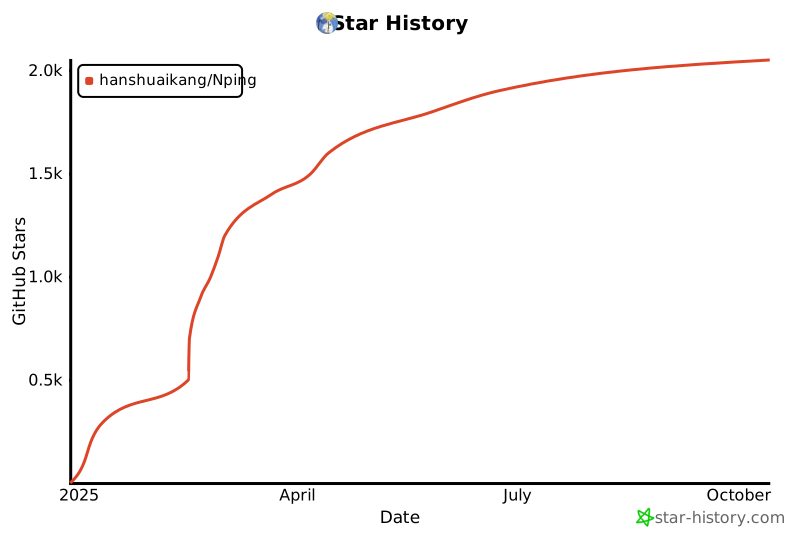
## Star History
[](https://star-history.com/#hanshuaikang/Nping&Date)", Assign "at most 3 tags" to the expected json: {"id":"13472","tags":[]} "only from the tags list I provide: []" returns me the "expected json"