AI prompts
base on A set of useful sliver tools that are missing from the flutter framework # sliver_tools
[](https://pub.dartlang.org/packages/sliver_tools)
A set of useful sliver tools that are missing from the flutter framework.
Here is a taste what you can make using this package
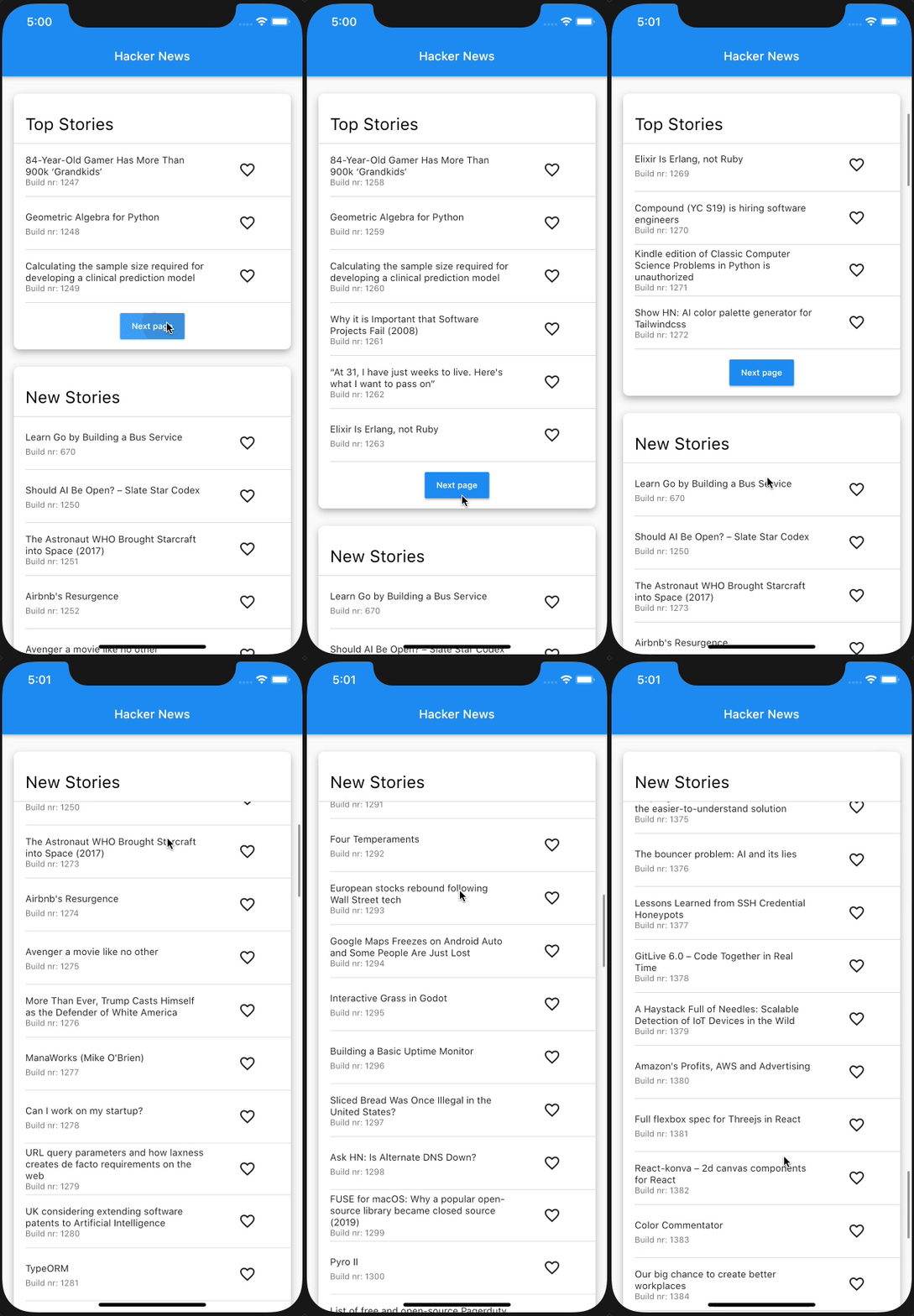
The structure of this app:
```dart
class Section extends State {
@override
Widget build(BuildContext context) {
return MultiSliver(
pushPinnedChildren: true,
children: <Widget>[
SliverPersistentHeader(
pinned: true,
...
),
if (!infinite)
SliverAnimatedPaintExtent(
child: SliverList(...),
)
else
SliverList(...),
],
);
}
}
class NewsPage extends StatelessWidget {
@override
Widget build(BuildContext context) {
return CustomScrollView(
slivers: <Widget>[
Section(infinite: false),
Section(infinite: true),
],
);
}
}
```
## [MultiSliver]
The [MultiSliver] widget allows for grouping of multiple slivers together such that they can be returned as a single widget.
For instance when one wants to wrap a few slivers with some padding or an inherited widget.
### Example
```dart
class WidgetThatReturnsASliver extends StatelessWidget {
@override
Widget build(BuildContext context) {
return MultiSliver(
pushPinnedChildren: false, // defaults to false
children: <Widget>[
SliverPersistentHeader(...),
SliverList(...),
],
);
}
}
```
The `pushPinnedChildren` parameter allows for achieving a 'sticky header' effect by simply using pinned `SliverPersistentHeader` widgets (or any custom sliver that paints beyond its layoutExtent).
## [SliverStack](https://github.com/Kavantix/sliver_tools/blob/master/lib/src/sliver_stack.dart)
The [SliverStack] widget allows for stacking of both slivers and box widgets.
This can be useful for adding some decoration to a sliver.
Which is what some of the other widgets in this package use to get their desired effects.
### Example
```dart
class WidgetThatReturnsASliver extends StatelessWidget {
@override
Widget build(BuildContext context) {
return SliverStack(
insetOnOverlap: false, // defaults to false
children: <Widget>[
SliverPositioned.fill(
child: Container(
decoration: BoxDecoration(
color: Colors.white,
boxShadow: const <BoxShadow>[
BoxShadow(
offset: Offset(0, 4),
blurRadius: 8,
color: Colors.black26,
)
],
borderRadius: BorderRadius.circular(8),
),
),
),
SliverList(...),
],
);
}
}
```
The `insetOnOverlap` handles whether the positioned children should be inset (made smaller) when the sliver has overlap from a previous sliver.
## [SliverClip]
The [SliverClip] widget will add a clip around its child from the child's paintOrigin to its paintExtent.
This is very useful and most likely what you want when using a pinned SliverPersistentHeader as child of the stack.
### Example
```dart
class WidgetThatReturnsASliver extends StatelessWidget {
@override
Widget build(BuildContext context) {
return SliverClip(
clipOverlap: true, // defaults to true
child: SliverList(...),
);
}
}
```
The `clipOverlap` parameter allows for configuring whether any overlap with the previous child should be clipped.
This can be useful when one has a SliverPersitentHeader above a SliverList and does not want to give the header an opaque background but also prevent the list from drawing underneath the header.
## [SliverAnimatedPaintExtent]
The [SliverAnimatedPaintExtent] widget allows for having a smooth transition when a sliver changes the space it will occupy inside the viewport.
For instance when using a SliverList with a button below it that loads the next few items.
### Example
```dart
class WidgetThatReturnsASliver extends StatelessWidget {
@override
Widget build(BuildContext context) {
return SliverAnimatedPaintExtent(
duration: const Duration(milliseconds: 150),
child: SliverList(...),
);
}
}
```
## [SliverAnimatedSwitcher]
The [SliverAnimatedSwitcher] widget is simply a pre-configured `AnimatedSwitcher` widget.
If one needs more options than supplied by this widget a regular `AnimatedSwitcher` can be used by giving it the `defaultLayoutBuilder` and `defaultTransitionBuilder` of [SliverAnimatedSwitcher].
## [SliverCrossAxisConstrained]
The [SliverCrossAxisConstrained] widget allows for limiting the cross axis extent of a sliver to a maximum value given by the `maxCrossAxisExtent`.
For instance a long list of text items on an iPad would be too wide to read so one can wrap the SliverList in a [SliverCrossAxisConstrained] and limit its width to something more reasonable.
### Example
```dart
class WidgetThatReturnsASliver extends StatelessWidget {
@override
Widget build(BuildContext context) {
return SliverCrossAxisConstrained(
maxCrossAxisExtent: 700,
alignment: 0, // between -1.0 (left) and 1.0 (right)
child: SliverList(...),
);
}
}
```
## [SliverCrossAxisPadded]
The [SliverCrossAxisPadded] widget allows for adding padding to the cross axis of a sliver.
This can be done either by passing a `paddingStart` and/or `paddingEnd` or by using the `symmetric` constructor which takes a single padding value.
When using `paddingStart` and `paddingEnd` in a vertical sliver it will depend on the `TextDirection` whether start is left or right.
### Example
```dart
class WidgetThatReturnsASliver extends StatelessWidget {
@override
Widget build(BuildContext context) {
return SliverCrossAxisPadded(
paddingStart: 24,
paddingEnd: 48,
textDirection: TextDirection.ltr, // optional, defaults to the Directionality specified by the context
child: SliverList(...),
);
}
}
```
## [SliverPinnedHeader]
The [SliverPinnedHeader] widget allows for easily making a pinned header.
It will size itself to the size of the child and when it reaches the leading edge of the viewport stay there instead of scrolling off the screen.
[MultiSliver]: https://github.com/Kavantix/sliver_tools/blob/master/lib/src/multi_sliver.dart
[SliverAnimatedPaintExtent]: https://github.com/Kavantix/sliver_tools/blob/master/lib/src/sliver_animated_paint_extent.dart
[SliverStack]: https://github.com/Kavantix/sliver_tools/blob/master/lib/src/sliver_stack.dart
[SliverClip]: https://github.com/Kavantix/sliver_tools/blob/master/lib/src/sliver_clip.dart
[SliverAnimatedSwitcher]: https://github.com/Kavantix/sliver_tools/blob/master/lib/src/sliver_animated_switcher.dart
[SliverCrossAxisConstrained]: https://github.com/Kavantix/sliver_tools/blob/master/lib/src/sliver_cross_axis_constrained.dart
[SliverCrossAxisPadded]: https://github.com/Kavantix/sliver_tools/blob/master/lib/src/sliver_cross_axis_padded.dart
[SliverPinnedHeader]: https://github.com/Kavantix/sliver_tools/blob/master/lib/src/sliver_pinned_header.dart
## Buy me a coffee ☕️
<a href="https://www.buymeacoffee.com/kavantix" target="_blank"><img src="https://cdn.buymeacoffee.com/buttons/default-orange.png" alt="Buy Me A Coffee" height="41" width="174"></a>
", Assign "at most 3 tags" to the expected json: {"id":"16604","tags":[]} "only from the tags list I provide: [{"id":77,"name":"3d"},{"id":89,"name":"agent"},{"id":17,"name":"ai"},{"id":54,"name":"algorithm"},{"id":24,"name":"api"},{"id":44,"name":"authentication"},{"id":3,"name":"aws"},{"id":27,"name":"backend"},{"id":60,"name":"benchmark"},{"id":72,"name":"best-practices"},{"id":39,"name":"bitcoin"},{"id":37,"name":"blockchain"},{"id":1,"name":"blog"},{"id":45,"name":"bundler"},{"id":58,"name":"cache"},{"id":21,"name":"chat"},{"id":49,"name":"cicd"},{"id":4,"name":"cli"},{"id":64,"name":"cloud-native"},{"id":48,"name":"cms"},{"id":61,"name":"compiler"},{"id":68,"name":"containerization"},{"id":92,"name":"crm"},{"id":34,"name":"data"},{"id":47,"name":"database"},{"id":8,"name":"declarative-gui "},{"id":9,"name":"deploy-tool"},{"id":53,"name":"desktop-app"},{"id":6,"name":"dev-exp-lib"},{"id":59,"name":"dev-tool"},{"id":13,"name":"ecommerce"},{"id":26,"name":"editor"},{"id":66,"name":"emulator"},{"id":62,"name":"filesystem"},{"id":80,"name":"finance"},{"id":15,"name":"firmware"},{"id":73,"name":"for-fun"},{"id":2,"name":"framework"},{"id":11,"name":"frontend"},{"id":22,"name":"game"},{"id":81,"name":"game-engine "},{"id":23,"name":"graphql"},{"id":84,"name":"gui"},{"id":91,"name":"http"},{"id":5,"name":"http-client"},{"id":51,"name":"iac"},{"id":30,"name":"ide"},{"id":78,"name":"iot"},{"id":40,"name":"json"},{"id":83,"name":"julian"},{"id":38,"name":"k8s"},{"id":31,"name":"language"},{"id":10,"name":"learning-resource"},{"id":33,"name":"lib"},{"id":41,"name":"linter"},{"id":28,"name":"lms"},{"id":16,"name":"logging"},{"id":76,"name":"low-code"},{"id":90,"name":"message-queue"},{"id":42,"name":"mobile-app"},{"id":18,"name":"monitoring"},{"id":36,"name":"networking"},{"id":7,"name":"node-version"},{"id":55,"name":"nosql"},{"id":57,"name":"observability"},{"id":46,"name":"orm"},{"id":52,"name":"os"},{"id":14,"name":"parser"},{"id":74,"name":"react"},{"id":82,"name":"real-time"},{"id":56,"name":"robot"},{"id":65,"name":"runtime"},{"id":32,"name":"sdk"},{"id":71,"name":"search"},{"id":63,"name":"secrets"},{"id":25,"name":"security"},{"id":85,"name":"server"},{"id":86,"name":"serverless"},{"id":70,"name":"storage"},{"id":75,"name":"system-design"},{"id":79,"name":"terminal"},{"id":29,"name":"testing"},{"id":12,"name":"ui"},{"id":50,"name":"ux"},{"id":88,"name":"video"},{"id":20,"name":"web-app"},{"id":35,"name":"web-server"},{"id":43,"name":"webassembly"},{"id":69,"name":"workflow"},{"id":87,"name":"yaml"}]" returns me the "expected json"