AI prompts
base on Rembg is a tool to remove images background # Rembg
[](https://img.shields.io/badge/License-MIT-blue.svg)
[](https://huggingface.co/spaces/KenjieDec/RemBG)
[](https://bgremoval.streamlit.app/)
[](https://colab.research.google.com/github/danielgatis/rembg/blob/main/rembg.ipynb)
[](https://repomapr.com/danielgatis/rembg)
<p align="center">
<img src="logo.png" alt="Rembg Logo" width="600" />
</p>
Rembg is a tool to remove image backgrounds. It can be used as a CLI, Python library, HTTP server, or Docker container.
**If this project has helped you, please consider making a [donation](https://www.buymeacoffee.com/danielgatis).**
## Sponsors
<table>
<tr>
<td align="center" vertical-align="center">
<a href="https://photoroom.com/api/remove-background?utm_source=rembg&utm_medium=github_webpage&utm_campaign=sponsor" >
<img src="https://font-cdn.photoroom.com/media/api-logo.png" width="120px;" alt="Unsplash" />
</a>
</td>
<td align="center" vertical-align="center">
<b>PhotoRoom Remove Background API</b>
<br />
<a href="https://photoroom.com/api/remove-background?utm_source=rembg&utm_medium=github_webpage&utm_campaign=sponsor">https://photoroom.com/api</a>
<br />
<p width="200px">
Fast and accurate background remover API<br/>
</p>
</td>
</tr>
</table>
## Requirements
```text
python: >=3.11, <3.14
```
## Installation
Choose **one** of the following backends based on your hardware:
### CPU support
```bash
pip install "rembg[cpu]" # for library
pip install "rembg[cpu,cli]" # for library + cli
```
### GPU support (NVIDIA/CUDA)
First, check if your system supports `onnxruntime-gpu` by visiting [onnxruntime.ai](https://onnxruntime.ai/getting-started) and reviewing the installation matrix.
<p style="display: flex;align-items: center;justify-content: center;">
<img alt="onnxruntime-installation-matrix" src="./onnxruntime-installation-matrix.png" width="400" />
</p>
If your system is compatible, run:
```bash
pip install "rembg[gpu]" # for library
pip install "rembg[gpu,cli]" # for library + cli
```
> **Note:** NVIDIA GPUs may require `onnxruntime-gpu`, CUDA, and `cudnn-devel`. See [#668](https://github.com/danielgatis/rembg/issues/668#issuecomment-2689830314) for details. If `rembg[gpu]` doesn't work and you can't install CUDA or `cudnn-devel`, use `rembg[cpu]` with `onnxruntime` instead.
### GPU support (AMD/ROCm)
ROCm support requires the `onnxruntime-rocm` package. Install it by following [AMD's documentation](https://rocm.docs.amd.com/projects/radeon/en/latest/docs/install/native_linux/install-onnx.html).
Once `onnxruntime-rocm` is installed and working, install rembg with ROCm support:
```bash
pip install "rembg[rocm]" # for library
pip install "rembg[rocm,cli]" # for library + cli
```
## Usage as a CLI
After installation, you can use rembg by typing `rembg` in your terminal.
The `rembg` command has 4 subcommands, one for each input type:
- `i` - single files
- `p` - folders (batch processing)
- `s` - HTTP server
- `b` - RGB24 pixel binary stream
You can get help about the main command using:
```shell
rembg --help
```
You can also get help for any subcommand:
```shell
rembg <COMMAND> --help
```
### rembg `i`
Used for processing single files.
**Remove background from a remote image:**
```shell
curl -s http://input.png | rembg i > output.png
```
**Remove background from a local file:**
```shell
rembg i path/to/input.png path/to/output.png
```
**Specify a model:**
```shell
rembg i -m u2netp path/to/input.png path/to/output.png
```
**Return only the mask:**
```shell
rembg i -om path/to/input.png path/to/output.png
```
**Apply alpha matting:**
```shell
rembg i -a path/to/input.png path/to/output.png
```
**Pass extra parameters (SAM example):**
```shell
rembg i -m sam -x '{ "sam_prompt": [{"type": "point", "data": [724, 740], "label": 1}] }' examples/plants-1.jpg examples/plants-1.out.png
```
**Pass extra parameters (custom model):**
```shell
rembg i -m u2net_custom -x '{"model_path": "~/.u2net/u2net.onnx"}' path/to/input.png path/to/output.png
```
### rembg `p`
Used for batch processing entire folders.
**Process all images in a folder:**
```shell
rembg p path/to/input path/to/output
```
**Watch mode (process new/changed files automatically):**
```shell
rembg p -w path/to/input path/to/output
```
### rembg `s`
Used to start an HTTP server.
```shell
rembg s --host 0.0.0.0 --port 7000 --log_level info
```
For complete API documentation, visit: `http://localhost:7000/api`
**Remove background from an image URL:**
```shell
curl -s "http://localhost:7000/api/remove?url=http://input.png" -o output.png
```
**Remove background from an uploaded image:**
```shell
curl -s -F file=@/path/to/input.jpg "http://localhost:7000/api/remove" -o output.png
```
### rembg `b`
Process a sequence of RGB24 images from stdin. This is intended to be used with programs like FFmpeg that output RGB24 pixel data to stdout.
```shell
rembg b <width> <height> -o <output_specifier>
```
**Arguments:**
| Argument | Description |
|----------|-------------|
| `width` | Width of input image(s) |
| `height` | Height of input image(s) |
| `output_specifier` | Printf-style specifier for output filenames (e.g., `output-%03u.png` produces `output-000.png`, `output-001.png`, etc.). Omit to write to stdout. |
**Example with FFmpeg:**
```shell
ffmpeg -i input.mp4 -ss 10 -an -f rawvideo -pix_fmt rgb24 pipe:1 | rembg b 1280 720 -o folder/output-%03u.png
```
> **Note:** The width and height must match FFmpeg's output dimensions. The flags `-an -f rawvideo -pix_fmt rgb24 pipe:1` are required for FFmpeg compatibility.
## Usage as a Library
**Input and output as bytes:**
```python
from rembg import remove
with open('input.png', 'rb') as i:
with open('output.png', 'wb') as o:
input = i.read()
output = remove(input)
o.write(output)
```
**Input and output as a PIL image:**
```python
from rembg import remove
from PIL import Image
input = Image.open('input.png')
output = remove(input)
output.save('output.png')
```
**Input and output as a NumPy array:**
```python
from rembg import remove
import cv2
input = cv2.imread('input.png')
output = remove(input)
cv2.imwrite('output.png', output)
```
**Force output as bytes:**
```python
from rembg import remove
with open('input.png', 'rb') as i:
with open('output.png', 'wb') as o:
input = i.read()
output = remove(input, force_return_bytes=True)
o.write(output)
```
**Batch processing with session reuse (recommended for performance):**
```python
from pathlib import Path
from rembg import remove, new_session
session = new_session()
for file in Path('path/to/folder').glob('*.png'):
input_path = str(file)
output_path = str(file.parent / (file.stem + ".out.png"))
with open(input_path, 'rb') as i:
with open(output_path, 'wb') as o:
input = i.read()
output = remove(input, session=session)
o.write(output)
```
For more examples, see the [examples](USAGE.md) page.
## Usage with Docker
### CPU Only
Replace the `rembg` command with `docker run danielgatis/rembg`:
```shell
docker run -v .:/data danielgatis/rembg i /data/input.png /data/output.png
```
### NVIDIA CUDA GPU Acceleration
**Requirements:** Your host must have the [NVIDIA Container Toolkit](https://docs.nvidia.com/datacenter/cloud-native/container-toolkit/latest/install-guide.html) installed.
CUDA acceleration requires `cudnn-devel`, so you need to build the Docker image yourself. See [#668](https://github.com/danielgatis/rembg/issues/668#issuecomment-2689914205) for details.
**Build the image:**
```shell
docker build -t rembg-nvidia-cuda-cudnn-gpu -f Dockerfile_nvidia_cuda_cudnn_gpu .
```
> **Note:** This image requires ~11GB of disk space (CPU version is ~1.6GB). Models are not included.
**Run the container:**
```shell
sudo docker run --rm -it --gpus all -v /dev/dri:/dev/dri -v $PWD:/data rembg-nvidia-cuda-cudnn-gpu i -m birefnet-general /data/input.png /data/output.png
```
**Tips:**
- You can create your own NVIDIA CUDA image and install `rembg[gpu,cli]` in it.
- Use `-v /path/to/models/:/root/.u2net` to store model files outside the container, avoiding re-downloads.
## Models
All models are automatically downloaded and saved to `~/.u2net/` on first use.
### Available Models
- u2net ([download](https://github.com/danielgatis/rembg/releases/download/v0.0.0/u2net.onnx), [source](https://github.com/xuebinqin/U-2-Net)): A pre-trained model for general use cases.
- u2netp ([download](https://github.com/danielgatis/rembg/releases/download/v0.0.0/u2netp.onnx), [source](https://github.com/xuebinqin/U-2-Net)): A lightweight version of u2net model.
- u2net_human_seg ([download](https://github.com/danielgatis/rembg/releases/download/v0.0.0/u2net_human_seg.onnx), [source](https://github.com/xuebinqin/U-2-Net)): A pre-trained model for human segmentation.
- u2net_cloth_seg ([download](https://github.com/danielgatis/rembg/releases/download/v0.0.0/u2net_cloth_seg.onnx), [source](https://github.com/levindabhi/cloth-segmentation)): A pre-trained model for Cloths Parsing from human portrait. Here clothes are parsed into 3 category: Upper body, Lower body and Full body.
- silueta ([download](https://github.com/danielgatis/rembg/releases/download/v0.0.0/silueta.onnx), [source](https://github.com/xuebinqin/U-2-Net/issues/295)): Same as u2net but the size is reduced to 43Mb.
- isnet-general-use ([download](https://github.com/danielgatis/rembg/releases/download/v0.0.0/isnet-general-use.onnx), [source](https://github.com/xuebinqin/DIS)): A new pre-trained model for general use cases.
- isnet-anime ([download](https://github.com/danielgatis/rembg/releases/download/v0.0.0/isnet-anime.onnx), [source](https://github.com/SkyTNT/anime-segmentation)): A high-accuracy segmentation for anime character.
- sam ([download encoder](https://github.com/danielgatis/rembg/releases/download/v0.0.0/vit_b-encoder-quant.onnx), [download decoder](https://github.com/danielgatis/rembg/releases/download/v0.0.0/vit_b-decoder-quant.onnx), [source](https://github.com/facebookresearch/segment-anything)): A pre-trained model for any use cases.
- birefnet-general ([download](https://github.com/danielgatis/rembg/releases/download/v0.0.0/BiRefNet-general-epoch_244.onnx), [source](https://github.com/ZhengPeng7/BiRefNet)): A pre-trained model for general use cases.
- birefnet-general-lite ([download](https://github.com/danielgatis/rembg/releases/download/v0.0.0/BiRefNet-general-bb_swin_v1_tiny-epoch_232.onnx), [source](https://github.com/ZhengPeng7/BiRefNet)): A light pre-trained model for general use cases.
- birefnet-portrait ([download](https://github.com/danielgatis/rembg/releases/download/v0.0.0/BiRefNet-portrait-epoch_150.onnx), [source](https://github.com/ZhengPeng7/BiRefNet)): A pre-trained model for human portraits.
- birefnet-dis ([download](https://github.com/danielgatis/rembg/releases/download/v0.0.0/BiRefNet-DIS-epoch_590.onnx), [source](https://github.com/ZhengPeng7/BiRefNet)): A pre-trained model for dichotomous image segmentation (DIS).
- birefnet-hrsod ([download](https://github.com/danielgatis/rembg/releases/download/v0.0.0/BiRefNet-HRSOD_DHU-epoch_115.onnx), [source](https://github.com/ZhengPeng7/BiRefNet)): A pre-trained model for high-resolution salient object detection (HRSOD).
- birefnet-cod ([download](https://github.com/danielgatis/rembg/releases/download/v0.0.0/BiRefNet-COD-epoch_125.onnx), [source](https://github.com/ZhengPeng7/BiRefNet)): A pre-trained model for concealed object detection (COD).
- birefnet-massive ([download](https://github.com/danielgatis/rembg/releases/download/v0.0.0/BiRefNet-massive-TR_DIS5K_TR_TEs-epoch_420.onnx), [source](https://github.com/ZhengPeng7/BiRefNet)): A pre-trained model with massive dataset.
- bria-rmbg ([download](https://github.com/danielgatis/rembg/releases/download/v0.0.0/bria-rmbg-2.0.onnx), [source](https://huggingface.co/briaai/RMBG-2.0)): A state-of-the-art background removal model by BRIA AI.
## FAQ
### When will this library support Python version 3.xx?
This library depends on [onnxruntime](https://pypi.org/project/onnxruntime). Python version support is determined by onnxruntime's compatibility.
## Support
If you find this project useful, consider buying me a coffee (or a beer):
<a href="https://www.buymeacoffee.com/danielgatis" target="_blank"><img src="https://bmc-cdn.nyc3.digitaloceanspaces.com/BMC-button-images/custom_images/orange_img.png" alt="Buy Me A Coffee" style="height: auto !important;width: auto !important;"></a>
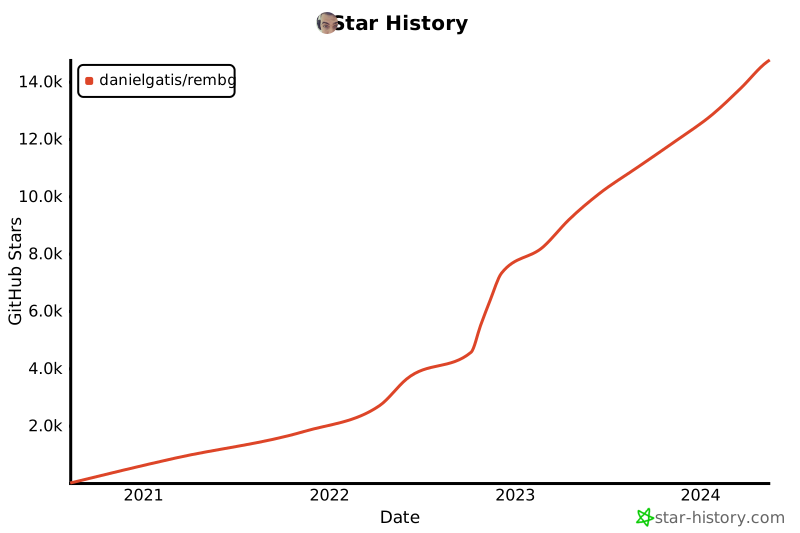
## Star History
[](https://star-history.com/#danielgatis/rembg&Date)
## License
Copyright (c) 2020-present [Daniel Gatis](https://github.com/danielgatis)
Licensed under the [MIT License](./LICENSE.txt).
", Assign "at most 3 tags" to the expected json: {"id":"2846","tags":[]} "only from the tags list I provide: [{"id":77,"name":"3d"},{"id":89,"name":"agent"},{"id":17,"name":"ai"},{"id":54,"name":"algorithm"},{"id":24,"name":"api"},{"id":44,"name":"authentication"},{"id":3,"name":"aws"},{"id":27,"name":"backend"},{"id":60,"name":"benchmark"},{"id":72,"name":"best-practices"},{"id":39,"name":"bitcoin"},{"id":37,"name":"blockchain"},{"id":1,"name":"blog"},{"id":45,"name":"bundler"},{"id":58,"name":"cache"},{"id":21,"name":"chat"},{"id":49,"name":"cicd"},{"id":4,"name":"cli"},{"id":64,"name":"cloud-native"},{"id":48,"name":"cms"},{"id":61,"name":"compiler"},{"id":68,"name":"containerization"},{"id":92,"name":"crm"},{"id":34,"name":"data"},{"id":47,"name":"database"},{"id":8,"name":"declarative-gui "},{"id":9,"name":"deploy-tool"},{"id":53,"name":"desktop-app"},{"id":6,"name":"dev-exp-lib"},{"id":59,"name":"dev-tool"},{"id":13,"name":"ecommerce"},{"id":26,"name":"editor"},{"id":66,"name":"emulator"},{"id":62,"name":"filesystem"},{"id":80,"name":"finance"},{"id":15,"name":"firmware"},{"id":73,"name":"for-fun"},{"id":2,"name":"framework"},{"id":11,"name":"frontend"},{"id":22,"name":"game"},{"id":81,"name":"game-engine "},{"id":23,"name":"graphql"},{"id":84,"name":"gui"},{"id":91,"name":"http"},{"id":5,"name":"http-client"},{"id":51,"name":"iac"},{"id":30,"name":"ide"},{"id":78,"name":"iot"},{"id":40,"name":"json"},{"id":83,"name":"julian"},{"id":38,"name":"k8s"},{"id":31,"name":"language"},{"id":10,"name":"learning-resource"},{"id":33,"name":"lib"},{"id":41,"name":"linter"},{"id":28,"name":"lms"},{"id":16,"name":"logging"},{"id":76,"name":"low-code"},{"id":90,"name":"message-queue"},{"id":42,"name":"mobile-app"},{"id":18,"name":"monitoring"},{"id":36,"name":"networking"},{"id":7,"name":"node-version"},{"id":55,"name":"nosql"},{"id":57,"name":"observability"},{"id":46,"name":"orm"},{"id":52,"name":"os"},{"id":14,"name":"parser"},{"id":74,"name":"react"},{"id":82,"name":"real-time"},{"id":56,"name":"robot"},{"id":65,"name":"runtime"},{"id":32,"name":"sdk"},{"id":71,"name":"search"},{"id":63,"name":"secrets"},{"id":25,"name":"security"},{"id":85,"name":"server"},{"id":86,"name":"serverless"},{"id":70,"name":"storage"},{"id":75,"name":"system-design"},{"id":79,"name":"terminal"},{"id":29,"name":"testing"},{"id":12,"name":"ui"},{"id":50,"name":"ux"},{"id":88,"name":"video"},{"id":20,"name":"web-app"},{"id":35,"name":"web-server"},{"id":43,"name":"webassembly"},{"id":69,"name":"workflow"},{"id":87,"name":"yaml"}]" returns me the "expected json"