base on Library for OpenAPI 3 with spring-boot 
[](https://ci-cd.springdoc.org:8443/view/springdoc-openapi/job/springdoc-openapi-starter-IC/)
[](https://sonarcloud.io/dashboard?id=springdoc_springdoc-openapi)
[](https://snyk.io/test/github/springdoc/springdoc-openapi.git)
[](https://stackoverflow.com/questions/tagged/springdoc?tab=Votes)
IMPORTANT: ``springdoc-openapi v1.8.0`` is the latest Open Source release supporting
Spring Boot 2.x and 1.x.
An extended support for [*springdoc-openapi v1*](https://springdoc.org/v1)
project is now available for organizations that need support beyond 2023.
For more details, feel free to reach
out: [
[email protected]](mailto:
[email protected])
``springdoc-openapi`` is on [Open Collective](https://opencollective.com/springdoc). If
you ❤️ this project consider becoming a [sponsor](https://github.com/sponsors/springdoc).
This project is sponsored by
<p align="center">
<a href="https://opensource.mercedes-benz.com/" target="_blank">
<img src="https://springdoc.org/img/mercedes-benz.png" height="10%" width="10%" />
</a>
<a href="https://www.dm-jobs.com/dmTECH/?locale=de_DE&wt_mc=.display.github.sponsoring.logo" target="_blank">
<img src="https://springdoc.org/img/dmTECH_Logo.jpg" height="10%" width="10%" />
</a>
<a href="https://www.contrastsecurity.com/" target="_blank">
<img src="https://springdoc.org/img/contrastsecurity.svg" height="10%" width="30%" />
</a>
<a href="https://www.lvm.de/" target="_blank">
<img src="https://springdoc.org/img/LVM_Versicherung_2010_logo.svg.png" height="10%" width="25%" />
</a>
<a href="https://gdnext.com/" target="_blank">
<img src="https://springdoc.org/img/gdnext.png" height="10%" width="10%" />
</a>
</p>
# Table of Contents
- [Full documentation](#full-documentation)
- [**Introduction**](#introduction)
- [**Getting Started**](#getting-started)
- [Library for springdoc-openapi integration with spring-boot and swagger-ui](#library-for-springdoc-openapi-integration-with-spring-boot-and-swagger-ui)
- [Spring-boot with OpenAPI Demo applications.](#spring-boot-with-openapi-demo-applications)
- [Source Code for Demo Applications.](#source-code-for-demo-applications)
- [Demo Spring Boot 2 Web MVC with OpenAPI 3.](#demo-spring-boot-2-web-mvc-with-openapi-3)
- [Demo Spring Boot 2 WebFlux with OpenAPI 3.](#demo-spring-boot-2-webflux-with-openapi-3)
- [Demo Spring Boot 2 WebFlux with Functional endpoints OpenAPI 3.](#demo-spring-boot-2-webflux-with-functional-endpoints-openapi-3)
- [Demo Spring Boot 2 and Spring Hateoas with OpenAPI 3.](#demo-spring-boot-2-and-spring-hateoas-with-openapi-3)
- [Integration of the library in a Spring Boot 3.x project without the swagger-ui:](#integration-of-the-library-in-a-spring-boot-3x-project-without-the-swagger-ui)
- [Error Handling for REST using @ControllerAdvice](#error-handling-for-rest-using-controlleradvice)
- [Adding API Information and Security documentation](#adding-api-information-and-security-documentation)
- [spring-webflux support with Annotated Controllers](#spring-webflux-support-with-annotated-controllers)
- [Using a separate management port (Spring Boot 3)](#using-a-separate-management-port-spring-boot-3)
- [When Spring Security is enabled](#when-spring-security-is-enabled)
- [Acknowledgements](#acknowledgements)
- [Contributors](#contributors)
- [Additional Support](#additional-support)
# [Full documentation](https://springdoc.org/)
# **Introduction**
The springdoc-openapi Java library helps automating the generation of API documentation
using Spring Boot projects.
springdoc-openapi works by examining an application at runtime to infer API semantics
based on Spring configurations, class structure and various annotations.
The library automatically generates documentation in JSON/YAML and HTML formatted pages.
The generated documentation can be complemented using `swagger-api` annotations.
This library supports:
* OpenAPI 3
* Spring-boot v3 (Java 17 & Jakarta EE 9)
* JSR-303, specifically for @NotNull, @Min, @Max, and @Size.
* Swagger-ui
* OAuth 2
* GraalVM native images
The following video introduces the Library:
* [https://youtu.be/utRxyPfFlDw](https://youtu.be/utRxyPfFlDw)
For *spring-boot v3* support, make sure you
use [springdoc-openapi v2](https://springdoc.org/)
This is a community-based project, not maintained by the Spring Framework Contributors (
Pivotal)
# **Getting Started**
## Library for springdoc-openapi integration with spring-boot and swagger-ui
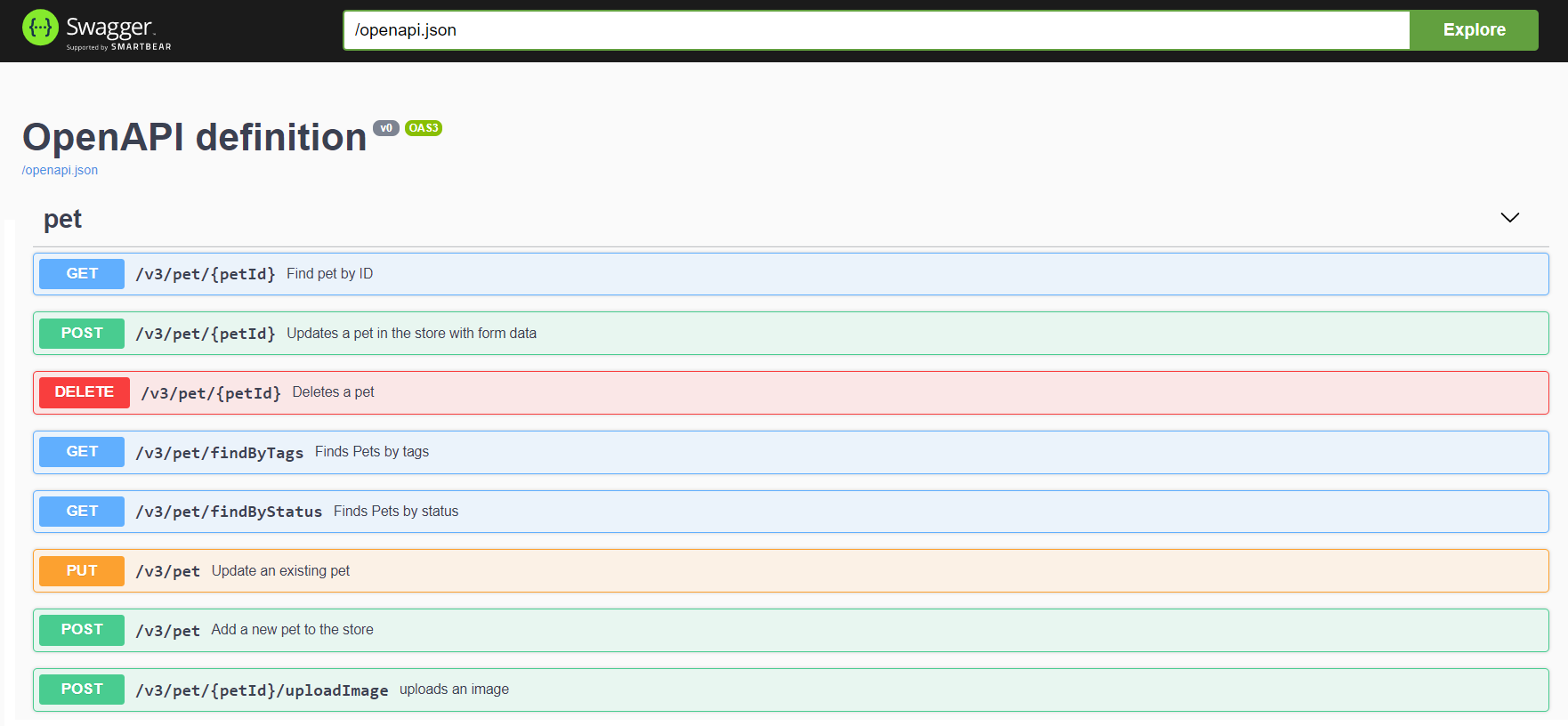
* Automatically deploys swagger-ui to a Spring Boot 3.x application
* Documentation will be available in HTML format, using the
official [swagger-ui jars](https://github.com/swagger-api/swagger-ui.git).
* The Swagger UI page should then be available at
http://server:port/context-path/swagger-ui.html and the OpenAPI description will be
available at the following url for JSON format:
http://server:port/context-path/v3/api-docs
* `server`: The server name or IP
* `port`: The server port
* `context-path`: The context path of the application
* Documentation can be available in yaml format as well, on the following path:
`/v3/api-docs.yaml`
* Add the `springdoc-openapi-ui` library to the list of your project dependencies (No
additional configuration is needed):
Maven
```xml
<dependency>
<groupId>org.springdoc</groupId>
<artifactId>springdoc-openapi-starter-webmvc-ui</artifactId>
<version>last-release-version</version>
</dependency>
```
Gradle
```groovy
implementation 'org.springdoc:springdoc-openapi-starter-webmvc-ui:latest'
```
* This step is optional: For custom path of the swagger documentation in HTML format, add
a custom springdoc property, in your spring-boot configuration file:
```properties
# swagger-ui custom path
springdoc.swagger-ui.path=/swagger-ui.html
```
## Spring-boot with OpenAPI Demo applications.
### [Source Code for Demo Applications](https://github.com/springdoc/springdoc-openapi-demos/tree/master).
## [Demo Spring Boot 3 Web MVC with OpenAPI 3](https://demos.springdoc.org/demo-spring-boot-3-webmvc).
## [Demo Spring Boot 3 WebFlux with OpenAPI 3](https://demos.springdoc.org/demo-spring-boot-3-webflux/swagger-ui.html).
## [Demo Spring Boot 3 WebFlux with Functional endpoints OpenAPI 3](https://demos.springdoc.org/demo-spring-boot-3-webflux-functional/swagger-ui.html).
## [Demo Spring Boot 3 and Spring Cloud Function Web MVC](https://demos.springdoc.org/spring-cloud-function-webmvc).
## [Demo Spring Boot 3 and Spring Cloud Function WebFlux](http://158.101.191.70:8085/swagger-ui.html).
## [Demo Spring Boot 3 and Spring Cloud Gateway](https://demos.springdoc.org/demo-microservices/swagger-ui.html).
## Integration of the library in a Spring Boot 3.x project without the swagger-ui:
* Documentation will be available at the following url for JSON format: http://server:
port/context-path/v3/api-docs
* `server`: The server name or IP
* `port`: The server port
* `context-path`: The context path of the application
* Documentation will be available in yaml format as well, on the following
path : `/v3/api-docs.yaml`
* Add the library to the list of your project dependencies. (No additional configuration
is needed)
Maven
```xml
<dependency>
<groupId>org.springdoc</groupId>
<artifactId>springdoc-openapi-starter-webmvc-api</artifactId>
<version>last-release-version</version>
</dependency>
```
Gradle
```groovy
implementation 'org.springdoc:springdoc-openapi-starter-webmvc-api:latest'
```
* This step is optional: For custom path of the OpenAPI documentation in Json format, add
a custom springdoc property, in your spring-boot configuration file:
```properties
# /api-docs endpoint custom path
springdoc.api-docs.path=/api-docs
```
* This step is optional: If you want to disable `springdoc-openapi` endpoints, add a
custom springdoc property, in your `spring-boot` configuration file:
```properties
# disable api-docs
springdoc.api-docs.enabled=false
```
## Error Handling for REST using @ControllerAdvice
To generate documentation automatically, make sure all the methods declare the HTTP Code
responses using the annotation: @ResponseStatus.
## Adding API Information and Security documentation
The library uses spring-boot application auto-configured packages to scan for the
following annotations in spring beans: OpenAPIDefinition and Info.
These annotations declare, API Information: Title, version, licence, security, servers,
tags, security and externalDocs.
For better performance of documentation generation, declare `@OpenAPIDefinition`
and `@SecurityScheme` annotations within a Spring managed bean.
## spring-webflux support with Annotated Controllers
* Documentation can be available in yaml format as well, on the following path :
/v3/api-docs.yaml
* Add the library to the list of your project dependencies (No additional configuration
is needed)
Maven
```xml
<dependency>
<groupId>org.springdoc</groupId>
<artifactId>springdoc-openapi-starter-webflux-ui</artifactId>
<version>last-release-version</version>
</dependency>
```
Gradle
```groovy
implementation 'org.springdoc:springdoc-openapi-starter-webflux-ui:latest'
```
* This step is optional: For custom path of the swagger documentation in HTML format, add
a custom springdoc property, in your spring-boot configuration file:
```properties
# swagger-ui custom path
springdoc.swagger-ui.path=/swagger-ui.html
```
The `springdoc-openapi` libraries are hosted on maven central repository.
The artifacts can be accessed at the following locations:
Releases:
* [https://central.sonatype.com/search?q=g:org.springdoc](https://central.sonatype.com/search?q=g:org.springdoc)
.
Snapshots:
* [https://central.sonatype.com/service/rest/repository/browse/maven-snapshots/org/springdoc/](https://central.sonatype.com/service/rest/repository/browse/maven-snapshots/org/springdoc/)
.
## Using a separate management port (Spring Boot 3)
Some Spring Boot apps run **Actuator** on a separate management port. In that case:
- **Application port** (e.g., `8080`) serves your app and springdoc endpoints:
- `http://localhost:8080/v3/api-docs`
- `http://localhost:8080/swagger-ui/index.html`
- **Management port** (e.g., `9090`) serves Actuator:
- `http://localhost:9090/actuator`
- `http://localhost:9090/actuator/health`
Minimal `application.yml`:
```yaml
server:
port: 8080
management:
server:
port: 9090
endpoints:
web:
exposure:
include: health,info
# springdoc is enabled by default with the starter;
# endpoints remain on the application port.
# (OpenAPI JSON = /v3/api-docs, Swagger UI = /swagger-ui/index.html)
```
### When Spring Security is enabled
With Spring Boot 3, `/v3/api-docs` and Swagger UI are served on the **application port**, while Actuator runs on the **management port**.
If Spring Security is enabled, explicitly permit the docs paths on the **application port**:
```java
@Bean
SecurityFilterChain api(HttpSecurity http) throws Exception {
http
.authorizeHttpRequests(auth -> auth
.requestMatchers(
"/v3/api-docs/**",
"/v3/api-docs.yaml",
"/swagger-ui/**",
"/swagger-ui.html"
).permitAll()
.anyRequest().authenticated()
);
return http.build();
}
```
# Acknowledgements
## Contributors
springdoc-openapi is relevant and updated regularly due to the valuable contributions from
its [contributors](https://github.com/springdoc/springdoc-openapi/graphs/contributors).
<a href="https://github.com/springdoc/springdoc-openapi/graphs/contributors">
<img src="https://contrib.rocks/image?repo=springdoc/springdoc-openapi" width="50%"/>
</a>
Thank you all for your support!
## Additional Support
* [Spring Team](https://spring.io/team) - Thanks for their support by sharing all relevant
resources around Spring projects.
* [JetBrains](https://www.jetbrains.com/?from=springdoc-openapi) - Thanks a lot for
supporting springdoc-openapi project.

", Assign "at most 3 tags" to the expected json: {"id":"5000","tags":[]} "only from the tags list I provide: []" returns me the "expected json"