AI prompts
base on Chris Titus Tech's Windows Utility - Install Programs, Tweaks, Fixes, and Updates # Chris Titus Tech's Windows Utility
[](https://github.com/ChrisTitusTech/winutil/releases/latest)

[](https://discord.gg/RUbZUZyByQ)
[](https://winutil.christitus.com/)
This utility is a compilation of Windows tasks I perform on each Windows system I use. It is meant to streamline *installs*, debloat with *tweaks*, troubleshoot with *config*, and fix Windows *updates*. I am extremely picky about any contributions to keep this project clean and efficient.

## 💡 Usage
Winutil must be run in Admin mode because it performs system-wide tweaks. To achieve this, run PowerShell as an administrator. Here are a few ways to do it:
1. **Start menu Method:**
- Right-click on the start menu.
- Choose "Windows PowerShell (Admin)" (for Windows 10) or "Terminal (Admin)" (for Windows 11).
2. **Search and Launch Method:**
- Press the Windows key.
- Type "PowerShell" or "Terminal" (for Windows 11).
- Press `Ctrl + Shift + Enter` or Right-click and choose "Run as administrator" to launch it with administrator privileges.
### Launch Command
#### Stable Branch (Recommended)
```ps1
irm "https://christitus.com/win" | iex
```
#### Dev Branch
```ps1
irm "https://christitus.com/windev" | iex
```
If you have Issues, refer to [Known Issues](https://winutil.christitus.com/knownissues/) or [Create Issue](https://github.com/ChrisTitusTech/winutil/issues)
## 🎓 Documentation
### [WinUtil Official Documentation](https://winutil.christitus.com/)
### [YouTube Tutorial](https://www.youtube.com/watch?v=6UQZ5oQg8XA)
### [ChrisTitus.com Article](https://christitus.com/windows-tool/)
## 🛠️ Build & Develop
> [!NOTE]
> Winutil is a relatively large script, so it's split into multiple files which're combined into a single `.ps1` file using a custom compiler. This makes maintaining the project a lot easier.
Get a copy of the source code, this can be done using GitHub UI (`Code -> Download ZIP`), or by cloning (downloading) the repo using git.
If git is installed, run the following commands under a PowerShell window to clone and move into project's directory:
```ps1
git clone --depth 1 "https://github.com/ChrisTitusTech/winutil.git"
cd winutil
```
To build the project, run the Compile Script under a PowerShell window (admin permissions IS NOT required):
```ps1
.\Compile.ps1
```
You'll see a new file named `winutil.ps1`, which's created by `Compile.ps1` script, now you can run it as admin and a new window will popup, enjoy your own compiled version of WinUtil :)
> [!TIP]
> For more info on using WinUtil and how to develop for it, please consider reading [the Contribution Guidelines](https://winutil.christitus.com/contributing/), if you don't know where to start, or have questions, you can ask over on our [Discord Community Server](https://discord.gg/RUbZUZyByQ) and active project members will answer when they can.
## 💖 Support
- To morally and mentally support the project, make sure to leave a ⭐️!
- EXE Wrapper for $10 @ https://www.cttstore.com/windows-toolbox
## 💖 Sponsors
These are the sponsors that help keep this project alive with monthly contributions.
<!-- sponsors --><a href="https://github.com/dwelfusius"><img src="https://github.com/dwelfusius.png" width="60px" alt="User avatar: " /></a><a href="https://github.com/mews-se"><img src="https://github.com/mews-se.png" width="60px" alt="User avatar: Martin Stockzell" /></a><a href="https://github.com/jdiegmueller"><img src="https://github.com/jdiegmueller.png" width="60px" alt="User avatar: Jason A. Diegmueller" /></a><a href="https://github.com/robertsandrock"><img src="https://github.com/robertsandrock.png" width="60px" alt="User avatar: RMS" /></a><a href="https://github.com/KenichiQaz"><img src="https://github.com/KenichiQaz.png" width="60px" alt="User avatar: Stefan" /></a><a href="https://github.com/paulsheets"><img src="https://github.com/paulsheets.png" width="60px" alt="User avatar: Paul" /></a><a href="https://github.com/djones369"><img src="https://github.com/djones369.png" width="60px" alt="User avatar: Dave J (WhamGeek)" /></a><a href="https://github.com/anthonymendez"><img src="https://github.com/anthonymendez.png" width="60px" alt="User avatar: Anthony Mendez" /></a><a href="https://github.com/FatBastard0"><img src="https://github.com/FatBastard0.png" width="60px" alt="User avatar: " /></a><a href="https://github.com/DursleyGuy"><img src="https://github.com/DursleyGuy.png" width="60px" alt="User avatar: DursleyGuy" /></a><a href="https://github.com/quaszi"><img src="https://github.com/quaszi.png" width="60px" alt="User avatar: " /></a><a href="https://github.com/DwayneTheRockLobster1"><img src="https://github.com/DwayneTheRockLobster1.png" width="60px" alt="User avatar: " /></a><a href="https://github.com/KieraKujisawa"><img src="https://github.com/KieraKujisawa.png" width="60px" alt="User avatar: Kiera Meredith" /></a><a href="https://github.com/andrewpayne68"><img src="https://github.com/andrewpayne68.png" width="60px" alt="User avatar: Andrew P" /></a><a href="https://github.com/nathanzilgo"><img src="https://github.com/nathanzilgo.png" width="60px" alt="User avatar: Nathan Fernandes Pedroza" /></a><!-- sponsors -->
## 🏅 Thanks to all Contributors
Thanks a lot for spending your time helping Winutil grow. Thanks a lot! Keep rocking 🍻.
[](https://github.com/ChrisTitusTech/winutil/graphs/contributors)
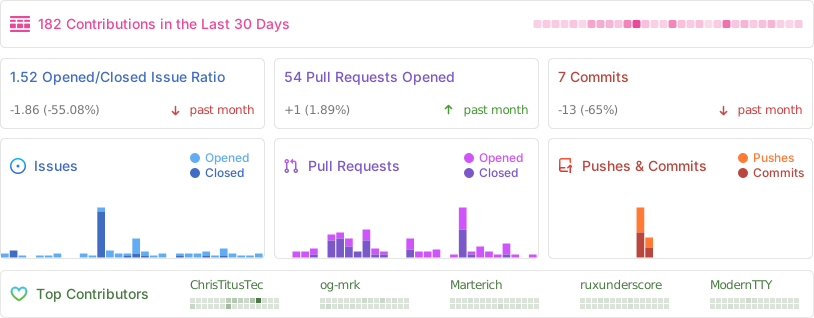
## 📊 GitHub Stats
", Assign "at most 3 tags" to the expected json: {"id":"7117","tags":[]} "only from the tags list I provide: []" returns me the "expected json"