AI prompts
base on [ECCV2024] IDM-VTON : Improving Diffusion Models for Authentic Virtual Try-on in the Wild
<div align="center">
<h1>IDM-VTON: Improving Diffusion Models for Authentic Virtual Try-on in the Wild</h1>
<a href='https://idm-vton.github.io'><img src='https://img.shields.io/badge/Project-Page-green'></a>
<a href='https://arxiv.org/abs/2403.05139'><img src='https://img.shields.io/badge/Paper-Arxiv-red'></a>
<a href='https://huggingface.co/spaces/yisol/IDM-VTON'><img src='https://img.shields.io/badge/%F0%9F%A4%97%20Hugging%20Face-Demo-yellow'></a>
<a href='https://huggingface.co/yisol/IDM-VTON'><img src='https://img.shields.io/badge/%F0%9F%A4%97%20Hugging%20Face-Model-blue'></a>
</div>
This is the official implementation of the paper ["Improving Diffusion Models for Authentic Virtual Try-on in the Wild"](https://arxiv.org/abs/2403.05139).
Star ⭐ us if you like it!
---


## Requirements
```
git clone https://github.com/yisol/IDM-VTON.git
cd IDM-VTON
conda env create -f environment.yaml
conda activate idm
```
## Data preparation
### VITON-HD
You can download VITON-HD dataset from [VITON-HD](https://github.com/shadow2496/VITON-HD).
After download VITON-HD dataset, move vitonhd_test_tagged.json into the test folder, and move vitonhd_train_tagged.json into the train folder.
Structure of the Dataset directory should be as follows.
```
train
|-- image
|-- image-densepose
|-- agnostic-mask
|-- cloth
|-- vitonhd_train_tagged.json
test
|-- image
|-- image-densepose
|-- agnostic-mask
|-- cloth
|-- vitonhd_test_tagged.json
```
### DressCode
You can download DressCode dataset from [DressCode](https://github.com/aimagelab/dress-code).
We provide pre-computed densepose images and captions for garments [here](https://kaistackr-my.sharepoint.com/:u:/g/personal/cpis7_kaist_ac_kr/EaIPRG-aiRRIopz9i002FOwBDa-0-BHUKVZ7Ia5yAVVG3A?e=YxkAip).
We used [detectron2](https://github.com/facebookresearch/detectron2) for obtaining densepose images, refer [here](https://github.com/sangyun884/HR-VITON/issues/45) for more details.
After download the DressCode dataset, place image-densepose directories and caption text files as follows.
```
DressCode
|-- dresses
|-- images
|-- image-densepose
|-- dc_caption.txt
|-- ...
|-- lower_body
|-- images
|-- image-densepose
|-- dc_caption.txt
|-- ...
|-- upper_body
|-- images
|-- image-densepose
|-- dc_caption.txt
|-- ...
```
## Training
### Preparation
Download pre-trained ip-adapter for sdxl(IP-Adapter/sdxl_models/ip-adapter-plus_sdxl_vit-h.bin) and image encoder(IP-Adapter/models/image_encoder) [here](https://github.com/tencent-ailab/IP-Adapter).
```
git clone https://huggingface.co/h94/IP-Adapter
```
Move ip-adapter to ckpt/ip_adapter, and image encoder to ckpt/image_encoder.
Start training using python file with arguments,
```
accelerate launch train_xl.py \
--gradient_checkpointing --use_8bit_adam \
--output_dir=result --train_batch_size=6 \
--data_dir=DATA_DIR
```
or, you can simply run with the script file.
```
sh train_xl.sh
```
## Inference
### VITON-HD
Inference using python file with arguments,
```
accelerate launch inference.py \
--width 768 --height 1024 --num_inference_steps 30 \
--output_dir "result" \
--unpaired \
--data_dir "DATA_DIR" \
--seed 42 \
--test_batch_size 2 \
--guidance_scale 2.0
```
or, you can simply run with the script file.
```
sh inference.sh
```
### DressCode
For DressCode dataset, put the category you want to generate images via category argument,
```
accelerate launch inference_dc.py \
--width 768 --height 1024 --num_inference_steps 30 \
--output_dir "result" \
--unpaired \
--data_dir "DATA_DIR" \
--seed 42
--test_batch_size 2
--guidance_scale 2.0
--category "upper_body"
```
or, you can simply run with the script file.
```
sh inference.sh
```
## Start a local gradio demo <a href='https://github.com/gradio-app/gradio'><img src='https://img.shields.io/github/stars/gradio-app/gradio'></a>
Download checkpoints for human parsing [here](https://huggingface.co/spaces/yisol/IDM-VTON/tree/main/ckpt).
Place the checkpoints under the ckpt folder.
```
ckpt
|-- densepose
|-- model_final_162be9.pkl
|-- humanparsing
|-- parsing_atr.onnx
|-- parsing_lip.onnx
|-- openpose
|-- ckpts
|-- body_pose_model.pth
```
Run the following command:
```python
python gradio_demo/app.py
```
## Acknowledgements
Thanks [ZeroGPU](https://huggingface.co/zero-gpu-explorers) for providing free GPU.
Thanks [IP-Adapter](https://github.com/tencent-ailab/IP-Adapter) for base codes.
Thanks [OOTDiffusion](https://github.com/levihsu/OOTDiffusion) and [DCI-VTON](https://github.com/bcmi/DCI-VTON-Virtual-Try-On) for masking generation.
Thanks [SCHP](https://github.com/GoGoDuck912/Self-Correction-Human-Parsing) for human segmentation.
Thanks [Densepose](https://github.com/facebookresearch/DensePose) for human densepose.
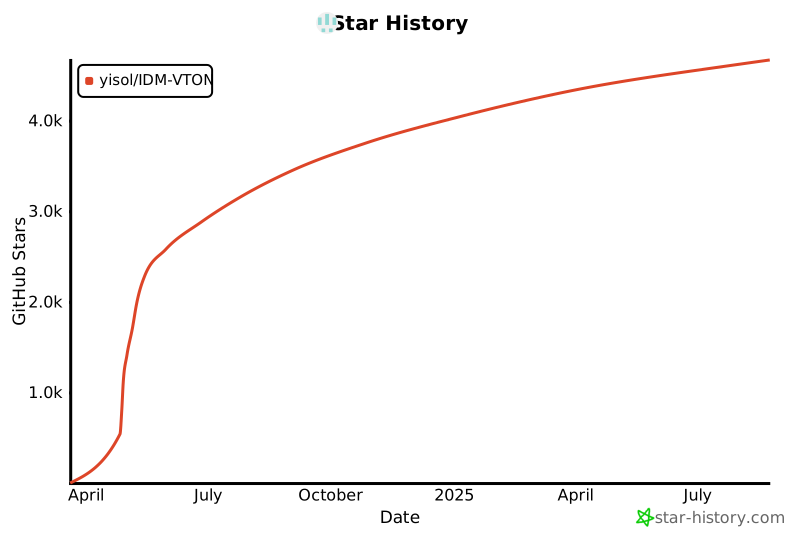
## Star History
[](https://star-history.com/#yisol/IDM-VTON&Date)
## Citation
```
@article{choi2024improving,
title={Improving Diffusion Models for Authentic Virtual Try-on in the Wild},
author={Choi, Yisol and Kwak, Sangkyung and Lee, Kyungmin and Choi, Hyungwon and Shin, Jinwoo},
journal={arXiv preprint arXiv:2403.05139},
year={2024}
}
```
## License
The codes and checkpoints in this repository are under the [CC BY-NC-SA 4.0 license](https://creativecommons.org/licenses/by-nc-sa/4.0/legalcode).
", Assign "at most 3 tags" to the expected json: {"id":"9636","tags":[]} "only from the tags list I provide: [{"id":77,"name":"3d"},{"id":89,"name":"agent"},{"id":17,"name":"ai"},{"id":54,"name":"algorithm"},{"id":24,"name":"api"},{"id":44,"name":"authentication"},{"id":3,"name":"aws"},{"id":27,"name":"backend"},{"id":60,"name":"benchmark"},{"id":72,"name":"best-practices"},{"id":39,"name":"bitcoin"},{"id":37,"name":"blockchain"},{"id":1,"name":"blog"},{"id":45,"name":"bundler"},{"id":58,"name":"cache"},{"id":21,"name":"chat"},{"id":49,"name":"cicd"},{"id":4,"name":"cli"},{"id":64,"name":"cloud-native"},{"id":48,"name":"cms"},{"id":61,"name":"compiler"},{"id":68,"name":"containerization"},{"id":92,"name":"crm"},{"id":34,"name":"data"},{"id":47,"name":"database"},{"id":8,"name":"declarative-gui "},{"id":9,"name":"deploy-tool"},{"id":53,"name":"desktop-app"},{"id":6,"name":"dev-exp-lib"},{"id":59,"name":"dev-tool"},{"id":13,"name":"ecommerce"},{"id":26,"name":"editor"},{"id":66,"name":"emulator"},{"id":62,"name":"filesystem"},{"id":80,"name":"finance"},{"id":15,"name":"firmware"},{"id":73,"name":"for-fun"},{"id":2,"name":"framework"},{"id":11,"name":"frontend"},{"id":22,"name":"game"},{"id":81,"name":"game-engine "},{"id":23,"name":"graphql"},{"id":84,"name":"gui"},{"id":91,"name":"http"},{"id":5,"name":"http-client"},{"id":51,"name":"iac"},{"id":30,"name":"ide"},{"id":78,"name":"iot"},{"id":40,"name":"json"},{"id":83,"name":"julian"},{"id":38,"name":"k8s"},{"id":31,"name":"language"},{"id":10,"name":"learning-resource"},{"id":33,"name":"lib"},{"id":41,"name":"linter"},{"id":28,"name":"lms"},{"id":16,"name":"logging"},{"id":76,"name":"low-code"},{"id":90,"name":"message-queue"},{"id":42,"name":"mobile-app"},{"id":18,"name":"monitoring"},{"id":36,"name":"networking"},{"id":7,"name":"node-version"},{"id":55,"name":"nosql"},{"id":57,"name":"observability"},{"id":46,"name":"orm"},{"id":52,"name":"os"},{"id":14,"name":"parser"},{"id":74,"name":"react"},{"id":82,"name":"real-time"},{"id":56,"name":"robot"},{"id":65,"name":"runtime"},{"id":32,"name":"sdk"},{"id":71,"name":"search"},{"id":63,"name":"secrets"},{"id":25,"name":"security"},{"id":85,"name":"server"},{"id":86,"name":"serverless"},{"id":70,"name":"storage"},{"id":75,"name":"system-design"},{"id":79,"name":"terminal"},{"id":29,"name":"testing"},{"id":12,"name":"ui"},{"id":50,"name":"ux"},{"id":88,"name":"video"},{"id":20,"name":"web-app"},{"id":35,"name":"web-server"},{"id":43,"name":"webassembly"},{"id":69,"name":"workflow"},{"id":87,"name":"yaml"}]" returns me the "expected json"